The Easiest Way To Watch Your Old Home Movies On Any TV
If you have a stack of old home movies already digitized but still sitting on a hard drive, you are not alone. Many families have done the work of converting tapes and DVDs to digital files, then get stuck at the last step: actually enjoying them on the biggest screen in the house.
There are lots of technical ways to get video files onto a TV. Some involve USB sticks, laptop cables, or complicated media server software. They work, but they usually feel clumsy or too technical, especially for relatives who just want to sit down, click a remote, and watch family memories like a regular show.
If your priority is the easiest way to watch your already digitized home movies on your TV, the experience you are really looking for is a private streaming app that lives on your Smart TV. That is exactly what Projector is designed for.
What “Easy” Actually Means For Watching Home Movies On TV
When people ask for the easiest way to watch home videos on a TV, they usually want three things without any technical hassle. First, they want a simple way to upload videos from a phone, tablet, or computer. Second, they want to open an app on the TV and play any video instantly with a remote. Third, they want family members to be able to use it without needing instructions.
Traditional options can get close, but they tend to break one of those requirements. Plugging in a USB drive is simple, but navigating random file names with a TV remote is not. Casting from a phone can work, but if the person with the phone leaves the room, the party often stops. Media server software can be powerful, but it usually expects you to be comfortable with folders, codecs, file naming rules, and home networking.
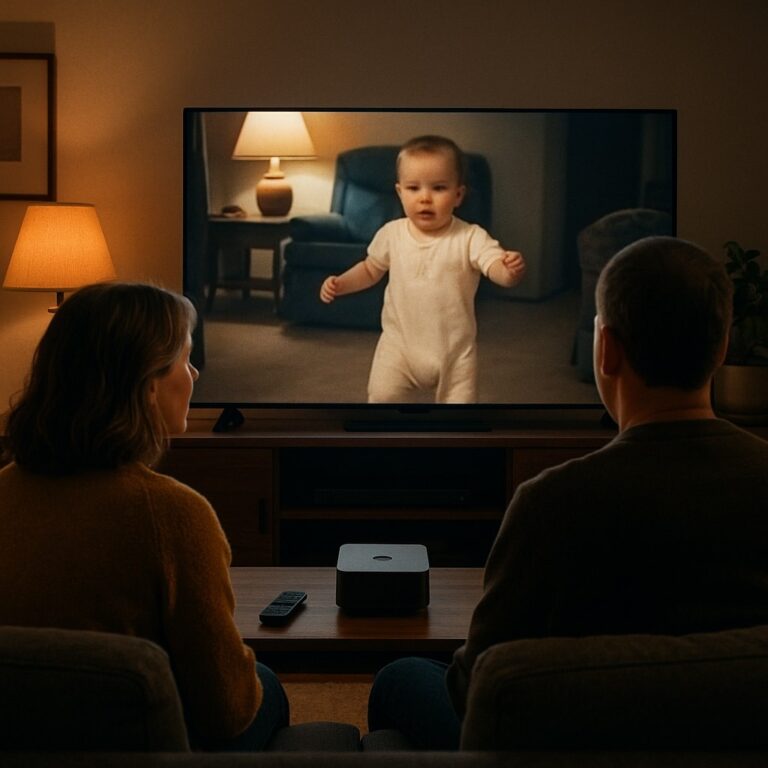
For most families, “easiest” feels like this: you sit down, open one app on Apple TV, Roku, or Google TV, then browse your home movies in a clean gallery that makes sense. That is the core experience that Projector offers.
Why A Private Streaming App Beats USB Sticks And Cables
USB drives, HDMI cables, and built in media players all sound simple at first. You copy your files, plug in, and hit play. The friction appears once you try to live with that setup for more than a single evening.
With USB playback, you usually have to keep updating the drive every time you find a new old clip, and different TVs have different limits on file types and sizes. You may discover that a video that plays on your computer refuses to open on the TV. Navigation is often just a list of file names in date order, so instead of “Jack’s First Birthday” you see something like “VID_20120314_001.mp4”. Relatives will not know what to pick, and there is no easy way to group clips into meaningful collections.
HDMI cables from a laptop or tablet can be a quick fix, but the computer becomes a permanent part of movie night. Someone has to manage the trackpad, keep the device from sleeping, and avoid notifications popping up in the middle of a special moment. It is functional, but it rarely feels relaxing.
A private streaming platform like Projector removes the hardware juggling. You upload your home movies to secure cloud storage once. After that, they are simply available inside a familiar TV app. No more copying files to sticks, hunting through folders, or dragging laptops into the living room.
How Projector Turns Your Home Movies Into A Private TV Library
Projector is built specifically for families who have personal videos and photo albums they want to watch on a Smart TV without dealing with technical setup. Instead of treating your home movies like random files, Projector treats them like a personal streaming library that only your family can see.
Once you create a Projector account, you upload your digitized home movies from any modern device. Old camcorder transfers, DVDs you converted, phone clips, even scanned slideshows can all live together in one place. Since storage is unlimited, you do not have to choose which years to keep or worry about running out of space as you keep discovering more footage.
On your TV, you install the Projector app on your preferred platform. Projector supports Apple TV, Roku, and Google TV, so it likely works with the streaming device you already own. Sign in, and your videos appear as organized collections, not bare file names. You can group by year, child, event, or whatever structure makes sense for how your family remembers your history.
From there, watching feels like using a familiar streaming service. Scroll with the remote, press play, and your memories stream in high quality on the big screen. Because everything lives in the cloud, there is no need to keep a computer running in a closet or maintain a local server.
Simple, Family Friendly Sharing On The Big Screen
One of the most satisfying parts of getting your old home movies onto a TV is sharing them. Grandparents, cousins, and visiting friends will often be in the room with you. Any solution you use has to be easy for them too, not just for the person who set it up.
Projector is built with that in mind. The TV experience is clean and family friendly. There are no public videos, no recommendations from strangers, and no distractions that pull you out of your own content. Guests can sit down, browse a familiar grid of thumbnails, and start a slideshow or playlist with just a few remote clicks.
Since Projector is cloud based, you can also let relatives in other homes enjoy the same collections on their own Smart TVs. Instead of mailing USB drives or walking them through complex network setups, you simply make the content available inside their Projector app. They get to experience your shared family history in the same polished way, even from miles away.
From Scattered Files To Organized TV Playlists
Digitizing old tapes and discs is a big project. The result is often a folder full of differently named clips that are hard to make sense of at a glance. That confusion is one of the reasons many people never progress from “digitized” to “watchable on TV.”
Projector helps bridge that gap by giving you tools to turn scattered clips into structured viewing experiences. You can create albums, playlists, and themed collections that play back-to-back on the TV. A whole evening can become “Summer Vacations,” “Holidays Through The Years,” or “Baby’s First Year” instead of random jumping between files.
This organization matters most when you have relatives who are not comfortable with technology. If what they see on screen is clearly labeled sections and big thumbnails, they can navigate confidently. If all they see are raw file names, they usually wait for someone else to drive. Projector is designed to let non-technical family members feel in control.
Why This Beats Running Your Own Media Server
Some power users consider setting up a home media server so they can stream local video files around the house. This can work very well, but it also expects you to be the ongoing IT department for your own living room. You need to keep a server device running, manage updates, and often conform to specific file naming patterns.
For families who simply want a reliable, easy way to enjoy home movies on the TV, that level of maintenance is rarely worth it. Projector delivers the same core benefit, which is seamless TV playback of personal videos, without the extra technical overhead. Your account and your apps handle the heavy lifting in the background.
The Unlimited video storage in Projector means you do not have to think about capacity planning either. As you digitize more boxes from the attic, you just keep adding them. Everything automatically becomes available on every TV that has the Projector app installed, with no need to expand drives or swap disks.
Quick Setup: From Digitized Files To TV In One Sitting
Getting started with Projector can usually be done in a single evening. If your home movies are already digitized, the process looks like this:
- Create your Projector account and sign in on a browser or mobile device.
- Upload your video files and any photo albums you want to see on your TV.
- Optionally group them into collections like years, events, or family members.
- Install the Projector app on your Apple TV, Roku, or Google TV.
- Sign in on the TV and start watching your memories right away.
After this one time setup, there is nothing to “re-plug” or reconfigure. Any time you upload new content, it simply appears on your TV, ready for the next family movie night.
Bringing Your Digitized Memories Back To Life
You already did the hard work of digitizing your old tapes and discs. The easiest way to actually enjoy those home movies on your TV is to treat them like a private streaming library instead of a pile of files. Projector gives you that experience: unlimited cloud storage for your personal videos and photos, simple apps on Apple TV, Roku, and Google TV, and an interface that any family member can use with confidence.
If your goal is to sit down, pick a memory, and watch it on the big screen without wrestling with wires, formats, or technical jargon, a dedicated home movie streaming platform is the simplest path. Projector is built for exactly that moment when your digitized history finally feels alive again in your living room.